Instructional System Design
An Onboarding Experience for OLI Torus
Target Audience
-
Users who are interested in using Torus as a course design tool.
-
New employees at Open Learning Initiative who work with Torus daily.
-
Subject Matter Experts who had to host multiple workshops onboarding users
My Role
I am the Full-Stack Instructional Designer for this project.
I independently led the end-to-end cycle of this project including content creation, video script writing, interface design and web-application development.
Tool Used
Figma
HTML/CSS/Javascript
Camatasia
Google Doc
?
Problem
The existing Torus onboarding materials were difficult for new users to navigate effectively due to several issues:
-
Long, Single Video Format – All onboarding content was condensed into lengthy video tutorials, making it time-consuming for users to locate specific information.
-
Scattered & Unstructured – Instead of a centralized learning hub, materials were listed as separate YouTube links on Torus website without clear categorization or integration.
-
Lack of Interactive Learning – The static video format did not allow users to engage with Torus in a hands-on way, making it harder to retain and apply knowledge.
As a result, new users often struggled to find relevant information quickly, leading to frustration and inefficiencies when learning to author, publish, and manage courses in Torus.
?
Solution
To address this challenge, I designed and developed a fully interactive, clickable tutorial system that walks users through Torus step by step, mimicking the real authoring environment.
Key Features of the Solution:
-
Guided Walkthroughs – Clear instructions integrated into an interactive, self-paced experience.
-
Persistent Navigation – A custom menu allows users to revisit key sections anytime.
-
Hands-On Interactions – Clickable elements allow users to simulate real actions within Torus.
-
Scenarios & Use Cases – Practical examples guide users in creating, structuring, and publishing courses.
-
Search Function Feature – A dedicated search tool lets users quickly locate relevant tutorials by matching keywords within video transcripts, with direct navigation to the selected section.
-
Scalable & Reusable Design – Can be updated and expanded easily as Torus evolves.
Process
1
Define Learning Objectives & Modules
Based on expert interviews and think-aloud studies, I identified key user pain points and knowledge gaps when onboarding to Torus.
From that research, I:
-
Defined clear learning objectives for each stage of the tutorial
-
Structured content into modular units, each aligned to a user task
-
Prioritized core features for autoplay and marked advanced features as optional, click-to-learn elements


2
Writing Instructional Scripts
Once the structure was set, I wrote instructional scripts that:
-
Mirror the real Torus interface and workflow
-
Use a friendly, supportive tone to guide new users
-
Include optional branches for deeper feature exploration
-
Highlight decision points and common misconceptions
This phase also included collaborative editing with Subject Matter Experts to ensure clarity and flow.

3
3
Voice & Video Production
I recorded all narration using my own voice for a more natural and human tone.
During production, I:
-
Synced narration with on-screen interactions
-
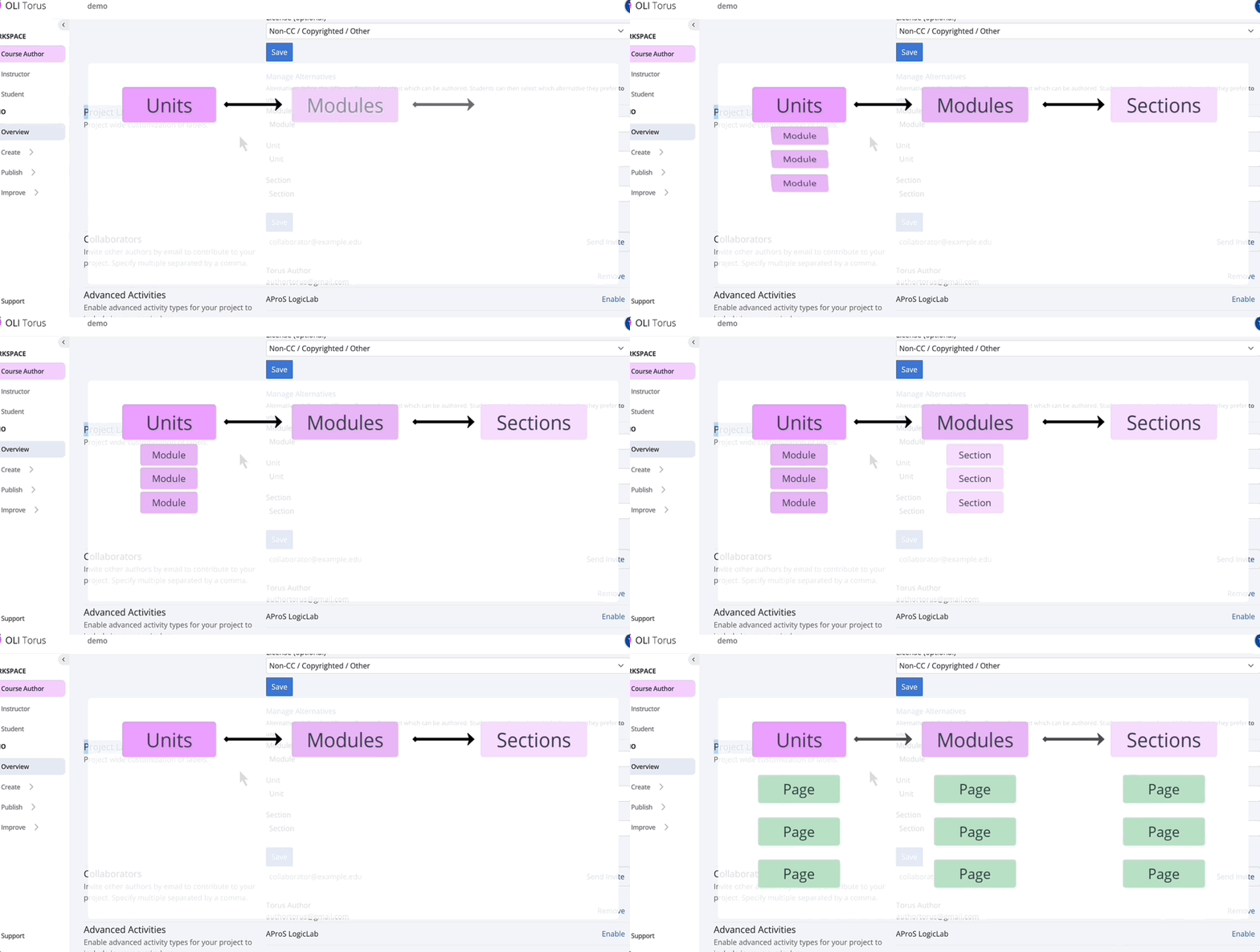
Created illustrative content to visualize concepts and show real UI behavior
-
Edited each segment for smooth transitions, timing, and clarity
-
Incorporated captions using the previously written scripts
This approach made the tutorial more engaging, authentic, and user-friendly.


4
4
Interface Prototyping in Figma
Before building the actual interaction, I designed the interface layout and menu structure in Figma to establish a clear visual flow.
This helped prototype:
-
A clean and intuitive layout
-
Persistent sidebar navigation
-
Visual grouping of related actions and tutorials


5
Full Development in Visual Studio Code
1. Interface Design
The system uses a unified HTML and CSS template to ensure a consistent look and feel across all tutorial pages.
-
A responsive video container fills the available space, with a dedicated blue title bar directly beneath the video.
-
Typography, spacing, and colors are standardized so design updates can be applied globally.
-
The layout adapts to different screen sizes to support responsive viewing.

2. Navigation System
A collapsible, scrollable sidebar menu allows users to browse tutorial sections efficiently.
-
Styled to match the target UI theme with smooth transitions and hover effects for better interactivity.
-
Sidebar items can expand/collapse for section grouping.
-
State-preserving navigation ensures users can move between tutorials without full page reloads.

3. Search System (Search Wrapper)
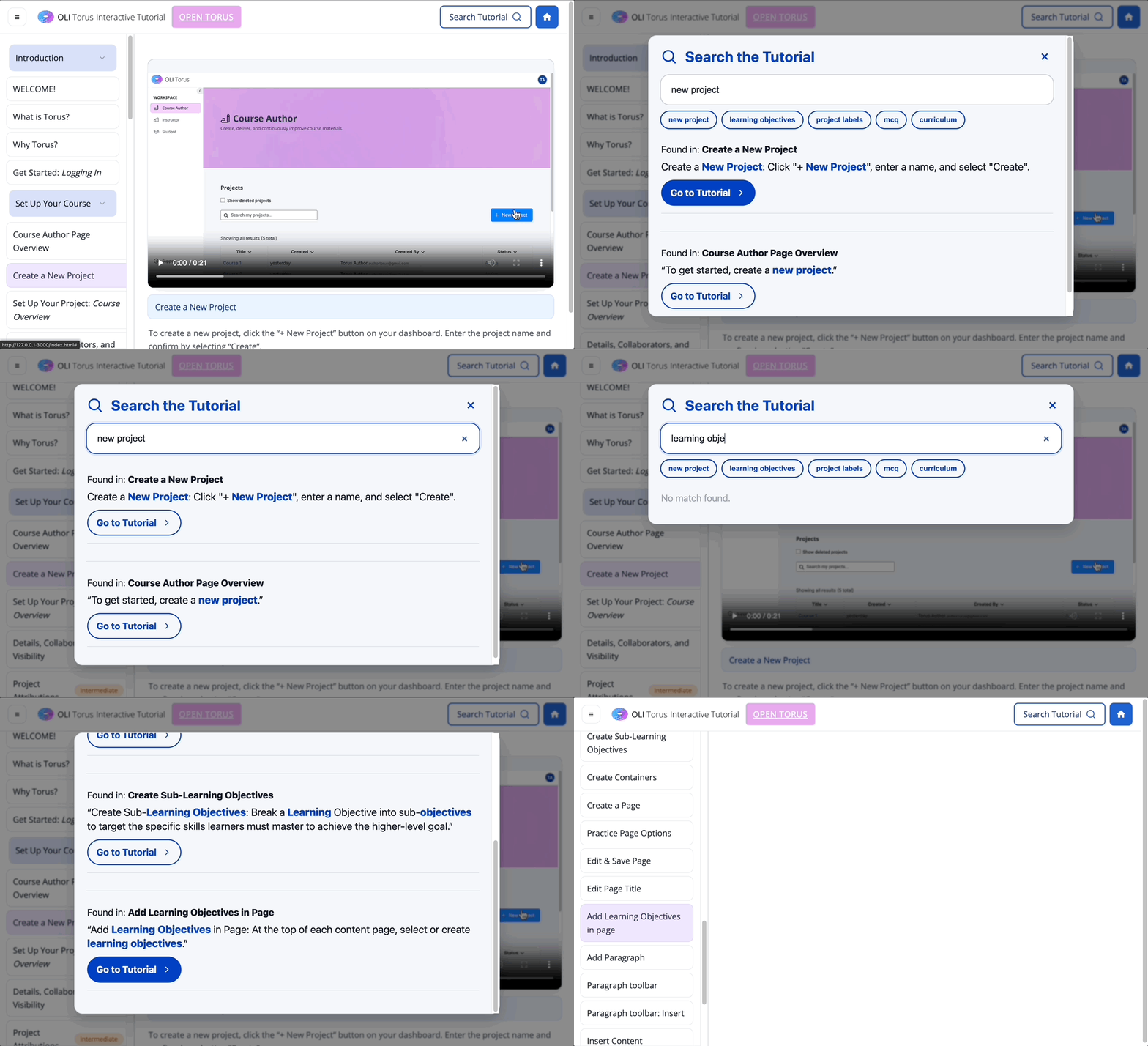
A dedicated search wrapper page integrates with transcript-data.js, which stores transcripts for every tutorial.
-
Fuzzy search matches keywords within transcripts, highlighting relevant results.
-
Each result includes a snippet of the matching transcript and a “Go to tutorial” button.
-
Clicking the button opens the corresponding tutorial page directly.
-
Modular design makes adding new tutorials as simple as updating the transcript data file.
4. Maintainability and Scalability
-
Consistent templates and centralized data allow rapid updates.
-
The modular JavaScript structure means features like search or new UI elements can be integrated without disrupting existing pages.
-
Future tutorials can follow the same template without extra configuration.
6
GitHub Demo
This demo is a prototype of the tutorial hub interface. The overall layout and interaction flow are in place, but the design elements are not fully finalized yet. Some videos have already been integrated so you can get a sense of how the experience will look and feel, while others are still placeholders or pending upload. The goal here is to show the structure, navigation, and core functionality, rather than a finished design.